Manual : Search Interface
Data
- This database is a retrieval system for the glyph list published in Georg Möller, Hieratische Paläographie, 3 volumes, 1909–12 (hereinafter referred to as "Hieratische Paläographie").
- As of January 31, 2021, it contains the main characters (1–613bis), numerals (614–719), and ligatures (I–LXXVII) from volumes 1–3.
- The original images of the Hieratische Paläographie are IIIF images provided by the Digital Library of the Asian Research Library, the University of Tokyo at Digital Resources for Egyptian Studies.
- IIIF image cropping and display uses Curation API, IIIF Curation Viewer, IIIF Curation Platform provided by the Center for Open Data in the Humanities.
Search Interface
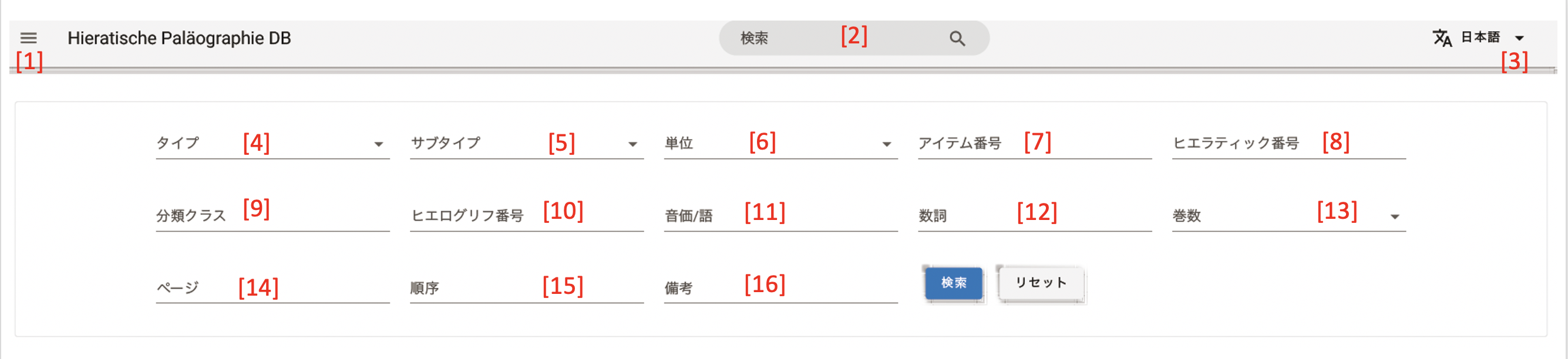
1Menu
You can select "Home", "Search", "Category", "User's Guide", etc.
2Full text search
Search the entire site.
3Language
You can switch the display language (ENGLISH / Japanese).
4Item Type
You can select Main characters (1–613bis), Ligatures (I–LXXVII), and Numerals (614–719).
5Sub Type
As sub-categories of Numerals (614–719), you can select "Cardinal", "Date", "Fraction", "Length", "Area", and "Volume".
6Unit
You can select "Single" and "Continuous". "Single" means the character is used independently. "Continuous" means two or more characters are written in sequence.
7Item No
Search by the item number listed in the Hieratische Paläographie (the number used as the heading of the data). Searching with an item number shows results including subdivisions. For example, searching for "192" shows "192, 192B, 192C".
8Hieratic No
You can search by Hieratic number. Hieratic numbers generally match the item numbers. However, for some items, unique numbers have been assigned on this site through consolidation and splitting.
9Category Class
You can narrow down by the classification class assigned to the hieroglyph number. The classification class refers to the alphabet at the beginning of the hieroglyph number. There are 26 types: A–Z (excluding J) and Aa.
10Hieroglyph No
You can search for hieratic from hieroglyph numbers. The hieroglyph numbers used in this database follow the numbering below.
However, some characters have been assigned unique auxiliary symbols. When searching by hieroglyph number, please enter "classification class (alphabet) + number" such as G17 or Aa2. Entering only the classification class (alphabet) will not return results.
11Phone/Word
You can search for hieratic by phonetic value or word. For searching, please enter alphabetic characters (half-width, English, uppercase, lowercase) using the Manuel de Codage (MdC) method. For example, to search for Ax, enter "Ax". Note that this database does not use auxiliary symbols for character arrangement (:)(*) or morpheme boundary symbols (.)(=). The Transliteration font is used for consonantal transliteration display.
- Manuel de Codage (MdC)
- True Type Font "Transliteration" (The Centre For Computer-aided Egyptological Research)
12Numeral
You can search for hieratic by numeral.
13Vol
You can specify the volume number of the Hieratische Paläographie.
14Page
You can specify the page number of the main text of the Hieratische Paläographie. Only a specific single page can be specified.
15Order
You can specify the arrangement order of character types within a page of the Hieratische Paläographie.
16Note
You can search information entered in the notes.